How to save DTF film on gang sheets
Film, ink and powder are paid by the inch, and on most gang sheets a good part of those inches is empty. You don't need a new printer to waste less. You need a tighter layout. Below is the difference it makes on one real order, then the habits that get you there.
The same order, laid out two ways
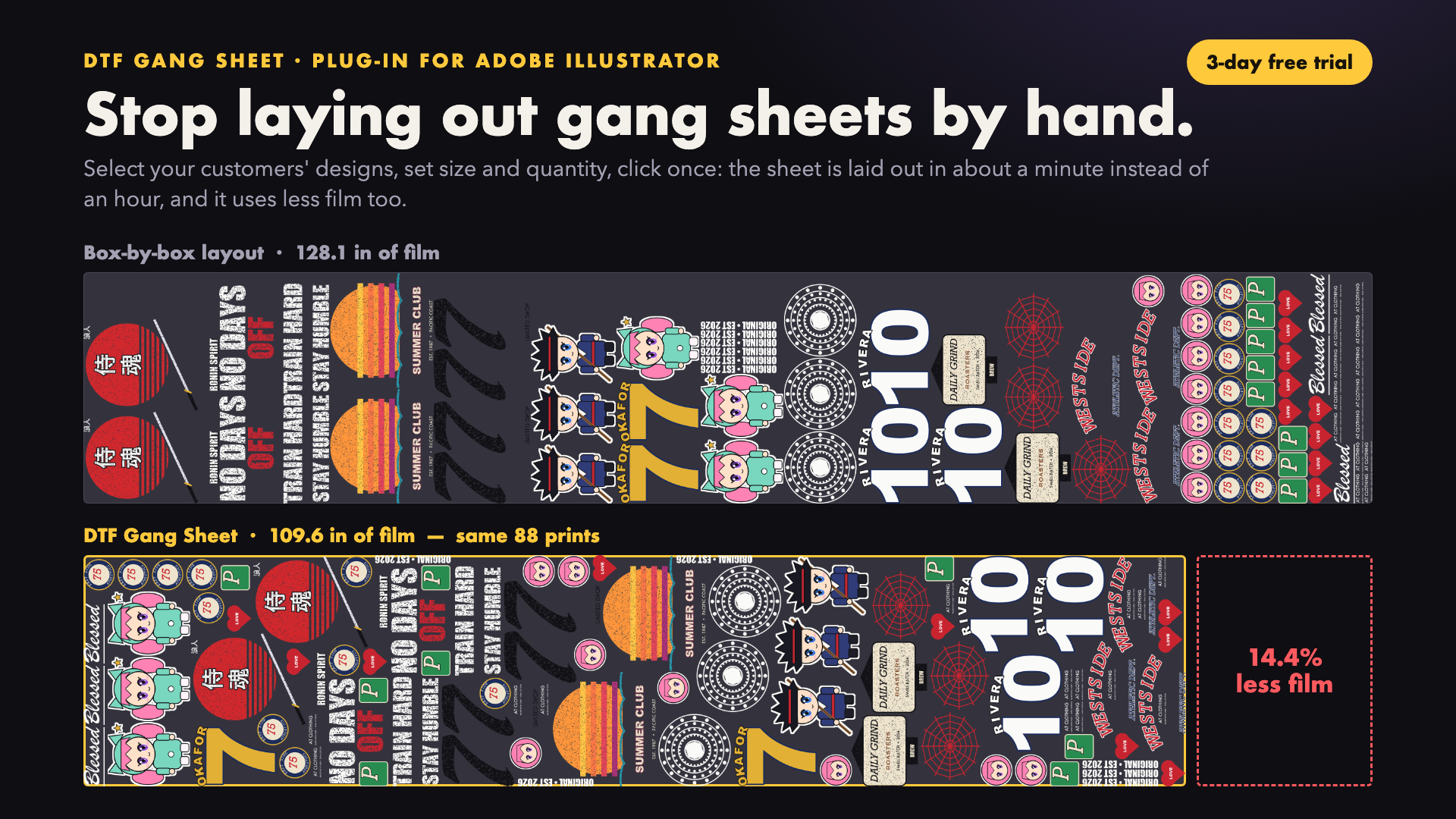
88 prints from 19 designs on 23-inch film (our own sample artwork). Placed box by box, the sheet is 128.1 inches long. Nested by each design's real shape, the same prints take 109.6 inches. That is 18.5 inches, about 14%, of film, ink and powder saved on one sheet. Multiply 18.5 by your cost per inch and by the sheets you print each week to see what it means for your shop.
Seven habits that save film
- Nest by shape, not by box. A round logo in a square box leaves four empty corners. Let smaller prints sit in the gaps of bigger ones, as long as the gap between the actual artwork stays the same.
- Turn designs. A tall design turned 90° often fills a row that would otherwise end with empty film.
- Place big prints first, small ones last. Left-chest logos, sleeve prints and tags are your filler. Put them in the holes that are left, not in rows of their own.
- Use the gap your cutting needs, not more. Every extra tenth of an inch is repeated between every pair of designs. Numbers by cutting method are in DTF gang sheet sizes and spacing.
- Trim the end. Cut the sheet where the last design ends. In Illustrator: Object › Artboards › Fit to Artwork Bounds.
- Combine orders. Two half sheets are more film than one full one. Gang small orders that go out on the same day.
- Check backgrounds. A white box or faint half-transparent pixels make a design bigger than it looks, and they print. Remove them before laying out.
By hand or automatic?
| By hand in Illustrator | Automatic (plug-in) | |
|---|---|---|
| Time per sheet | The better part of an hour on a full sheet | About a minute on our real shop files |
| Film | As tight as your patience that day | Same rules on every sheet |
| Mistakes | Missed copies, uneven gaps, ungrouped parts moved | Makes every copy from the quantity you type, warns about loose parts |
| Cost | Your time | A small subscription or one-time licence |
Doing it by hand is fine when you print a few sheets a week. Once layout is a daily job, the hours add up faster than the film does. The hand method, step by step, is in how to make a DTF gang sheet in Illustrator.
Questions people ask
- Where does most wasted DTF film come from?
- From empty space: the corners around designs placed as boxes, gaps wider than your cutting needs, a half-empty last row and blank film at the end of the sheet.
- Is nesting designs worth it for small orders?
- Yes. Even short sheets have an empty end and gaps around uneven shapes. The savings per sheet are small, but they repeat on every sheet you print.
- Is automatic gang sheet layout better than doing it by hand?
- A careful person can match a good automatic layout, but it takes them much longer. In our tests on real shop files the DTF Gang Sheet plug-in matched careful hand layouts in about a minute instead of an hour.
The faster way: let the plug-in lay it out
The nested layout in the picture above was made by DTF Gang Sheet, the plug-in for Illustrator we built for our own DTF shop. Select the designs, set size and quantity, press Make sheet. It reads each design's real outline, keeps copies together in tidy rows with a 0.1 inch gap, and never fills holes inside a design, so every print can still be cut out and pressed.
Try it free for 3 days, no card needed
Works in Adobe Illustrator CC 2015 or newer, on Windows and Mac.